
This post is being published in consultation with the Drupal Security Team.
As the maintainers of Drupal Commerce, we are advising users to upgrade immediately to the recently published releases of Commerce Core to protect against a vulnerability that may have financial impact.
We received two reports of attempts by malicious users to place fraudulent orders using a vulnerability patched in Commerce Core 3.3.13 and 8.x-2.41 (SA-CONTRIB-2026-254). Centarro and the Drupal Security Team looked for broader abuse of this issue. As of now we do not believe it was scripted or exploited beyond the initial sites.
We analyzed the issue in private with the Drupal Security Team, who coordinated the testing, packaging, and release of the module updates on October 28, 2026.
Attempted exploits have been observed on live sites
Those who reported the issue were merchants who observed suspicious activity on live sites, not merely security researchers evaluating the platform for vulnerabilities. Given that merchants observed this behavior, we highly recommend every user evaluate recent orders to determine whether or not any were fraudulently placed.
This vulnerability impacts both full-stack and headless sites, with attack vectors that differ based on the site’s architecture.
Identifying potential exploits
To determine if any of your recent orders were fraudulently placed or otherwise manipulated, evaluate them according to the following rubric organized according to exploits of increasing sophistication. Every Drupal Commerce site is unique, so you should evaluate the results of each item based on your knowledge of the legitimate behaviors your site supports.
- Look for orders that were placed but not paid, with no pending or authorized payments, indicating that an attacker may have bypassed payment steps in checkout. If your site is not configured such that customers can place legitimate free orders, these will require further scrutiny.
- Look for orders that were placed and appear as paid in the OMS but have no payment entities associated with them, indicating that an attacker simulated full payment without actually paying anything. This is primarily applicable to sites that support updating Commerce data via Drupal’s JSON:API module.
- Look for orders with suspicious product prices that would not naturally result from any promotion or price adjustment configured on the site, indicating that an attacker altered the price before completing checkout normally or placing the order illegitimately.
- Look for discounts, fees, or other adjustments on an order or order item that your staff didn’t add and do not derive from any promotion, indicating that an attacker altered adjustment field values before completing checkout normally or placing the order illegitimately.
Reports included orders placed with obviously incorrect prices (e.g., $0.01) and with normal prices. If you are unsure if a promotion or other price adjustment may have contributed to a price, one way to tell in most sites would be if the “Override the unit price” checkbox is enabled on an order item when your staff would not normally use it. Another would be to look for unknown adjustments in the order total summary on the order view page or on the old order edit form (Commerce Core <3.3.0).
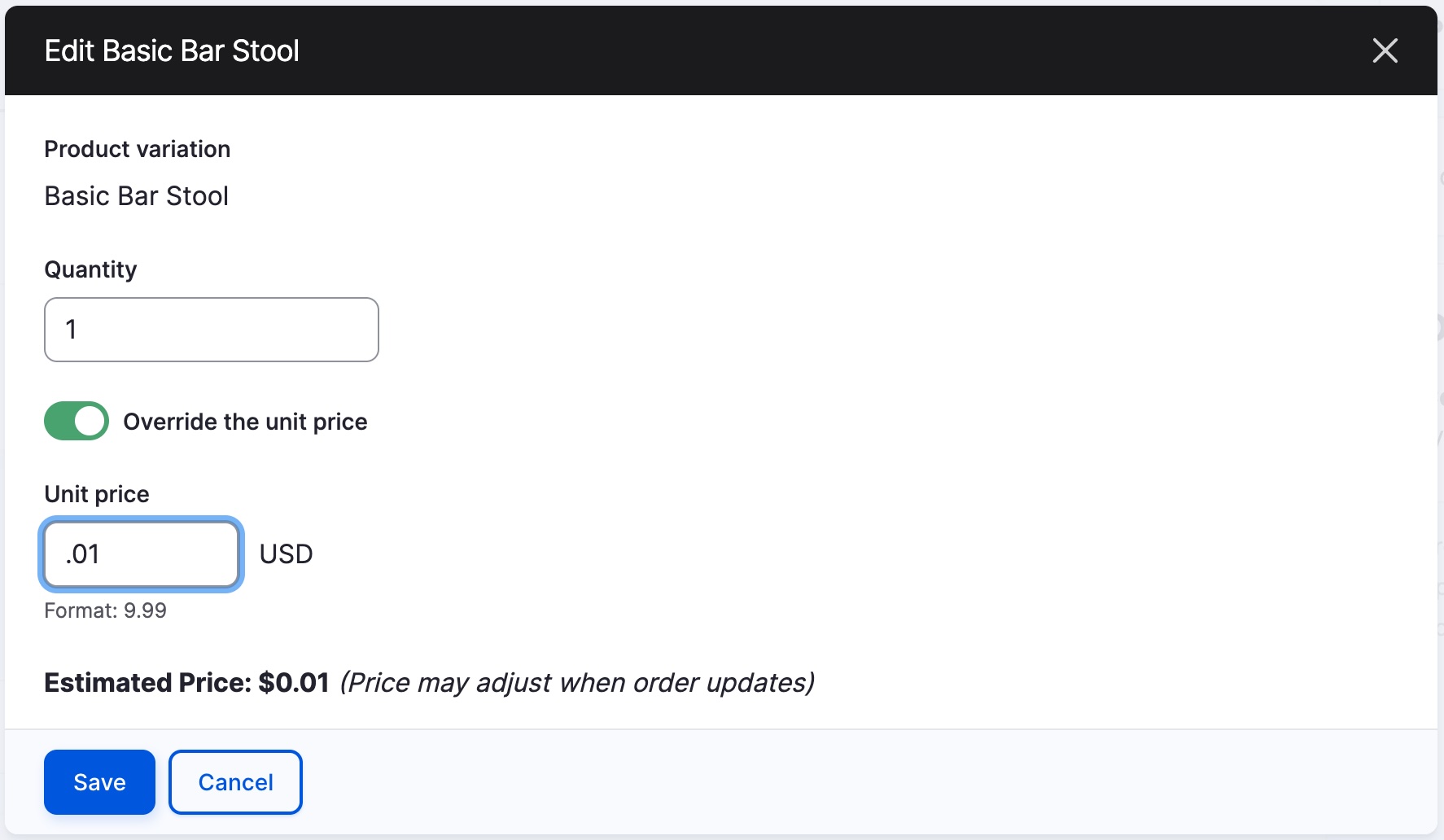
While the root vulnerability only recently came to our attention, exploits have been theoretically possible since Commerce Core 8.x-2.18 (released May 26, 2020) when used in conjunction with the JSON:API module, typically for decoupled applications, and since Commerce Core 8.x-2.25 (released June 30, 2021) for all others. This is not an exhaustive list of ways orders may have been manipulated but covers both the exploits observed in the wild and the most obvious ways a malicious user might attempt to defraud a merchant.
In addition to the Commerce Core release, we packaged security releases for Commerce API, Commerce License, Commerce Shipping, and Commerce Stripe that users should update at the same time. If your site doesn’t need to support update operations via JSON:API, we recommend switching it back to read-only and still updating as soon as possible.
Operational recommendations
While we’d prefer not to have to make such announcements, we’ll take this occasion to encourage everyone to review their operations to ensure the following:
- You routinely apply software updates to your Drupal site, so when a security advisory is published for a module you use, you can update immediately. Sites running unsupported or outdated code remain at risk longer if they cannot be quickly patched. (If you are still using Commerce Core 8.x-2.x, we recommend upgrading to 3.x as soon as possible, as support for 8.x-2.x will sunset when Drupal 12 is released.)
Security advisories are typically published on Wednesdays, and you should use the information on the advisory listing page to subscribe to be notified of security releases. - You do not fulfill any order in response to mere order placement or checkout completion. Drupal Commerce treats checkout completion as the staging of an order for fulfillment, but the details of an order, including full payment, should be confirmed before any goods or services are delivered.
- If you observe any suspicious behavior that represents a potential vulnerability in Drupal Commerce, you should use Drupal’s confidential process for reporting security issues. We would always rather review false positive or duplicate reports than not learn about a potential vulnerability.
Giving thanks
We’d like to thank the Drupal Security Team for helping us work through these issues. You can learn more about their work in this recent post by Tiffany Farriss, Interim CEO of the Drupal Association. We’d also like to thank Marcus Johansson for volunteering his own time to assist in identifying and reviewing these issues.
Finally, I’d personally like to thank Jonathan Sacksick, Tom Ashe, and Jakub Piasecki from Centarro for going the extra mile outside business hours to prepare solutions that solved the reported issues with minimal impact to the function of existing stores. If you lack internal resources to either apply updates or evaluate your site for exploits, our team maintains community and paid support channels to assist.
Using SQL to identify potential exploits
If you maintain a Drupal Commerce site and are capable of executing SQL queries against your site’s database, you can use the following queries to help identify exploits based on the rubric outlined above.
This is not an exhaustive list. Additionally, there are legitimate reasons to have placed orders that do not have payments or that have overridden unit prices, so even with these queries, it’s still up to your judgment whether or not the results represent any actual exploits.
The best confirmation is to match an order's IP address and time against access log messages to ensure an order was placed through normal paths beginning with /checkout/#.
Query 1: orders placed outside checkout with a balance due
Checkout places the order when it moves to the complete step, so every order placed through checkout has a checkout_step value of complete. The exploit places the order directly and leaves the checkout_step unchanged.
SELECT o.order_id, o.order_number, o.uid, o.mail, o.ip_address, o.state, FROM_UNIXTIME(o.placed) AS placed, o.checkout_step, o.total_price__number, o.total_paid__number, o.balance__number FROM commerce_order o WHERE o.placed IS NOT NULL AND o.state NOT IN ('draft', 'canceled') AND (o.checkout_step IS NULL OR o.checkout_step <> 'complete') AND o.balance__number > 0 ORDER BY o.placed DESC;Expect some legitimate results: orders placed by staff, orders placed through Commerce API or custom flows, and orders placed by a payment gateway webhook with only an authorized payment.
Query 2: amount paid exceeds recorded payments
Drupal Commerce calculates the total paid on an order by summing completed payment amounts. An order whose total paid is higher than that sum had it set some other way. Query 1 misses these orders, because their balance is zero.
SELECT o.order_id, o.order_number, o.mail, o.ip_address, o.state, FROM_UNIXTIME(o.placed) AS placed, o.total_paid__number, COALESCE(SUM(p.amount__number - COALESCE(p.refunded_amount__number, 0)), 0) AS paid_by_payments FROM commerce_order o LEFT JOIN commerce_payment p ON p.order_id = o.order_id AND p.completed IS NOT NULL WHERE o.placed IS NOT NULL AND o.total_paid__number > 0 GROUP BY o.order_id HAVING o.total_paid__number > paid_by_payments ORDER BY o.placed DESC;Recording a payment on the order later recalculates the total paid, so this query can miss orders that have had payments since.
Query 3: overridden unit prices
Query 1 would not catch a price lowered to $0.01 and then paid through checkout. Prices entered by hand set overridden_unit_price. Normal shopping doesn't.
SELECT oi.order_id, oi.order_item_id, oi.title, oi.unit_price__number, FROM_UNIXTIME(oi.changed) AS changed, o.uid, o.ip_address, o.state FROM commerce_order_item oi JOIN commerce_order o ON o.order_id = oi.order_id WHERE oi.overridden_unit_price = 1 ORDER BY oi.changed DESC;This also returns legitimate price overrides made by staff and order items related to "name your own price" or donation products.
Query 4: manually added adjustments
The adjustment widget lets the user choose any adjustment type (custom, fee, promotion, tax, or other adjustment types defined by contributed or custom modules), so filtering on the type isn't enough. Every adjustment added through the widget has the source ID custom, whatever its type. Adjustments are stored serialized.
SELECT 'order' AS level, a.entity_id AS order_id, o.uid, o.ip_address, o.state, FROM_UNIXTIME(o.changed) AS changed FROM commerce_order__adjustments a JOIN commerce_order o ON o.order_id = a.entity_id WHERE a.adjustments_value LIKE '%sourceId";s:6:"custom"%' UNION ALL SELECT 'order_item', oi.order_id, o.uid, o.ip_address, o.state, FROM_UNIXTIME(oi.changed) FROM commerce_order_item__adjustments a JOIN commerce_order_item oi ON oi.order_item_id = a.entity_id JOIN commerce_order o ON o.order_id = oi.order_id WHERE a.adjustments_value LIKE '%sourceId";s:6:"custom"%' ORDER BY changed DESC;This also returns legitimate adjustments added by staff.



Add new comment