
Register for our next webinar to see a live demonstration of Centarro Bootstrap.
Every new theme for a Drupal Commerce project starts with the same sequence: define your colors, configure button styles, set typography, style your forms, change icons, and then wire all of it into whatever page-building paradigm Drupal currently offers.
After twelve years, our front-end team accumulated a long list of friction points and recurring tasks. Centarro Bootstrap is the result of addressing all of them in a single, reusable foundation. What used to take weeks of custom theming can now be accomplished in hours.
The problem Centarro Bootstrap solves
Beyond making it faster and simpler to complete repetitive theming tasks that every custom Drupal website must perform, Centarro Bootstrap also helps with dynamic page layouts.
Drupal has gone through several iterations of page builders, both as contrib modules and part of Drupal core. Canvas is the current tool, which brings a Figma-like experience. Users can place components directly on a page, compose layouts visually, and see immediate results. Content teams can create single-use content straight from the interface.
But Canvas on its own has a gap. When you're assembling components, brand-specific details like colors and font choices live as properties on each individual component. Outside of code, there's no centralized place to define "this is my primary button style" or "these are my heading sizes" and have those decisions cascade everywhere. Change the brand's secondary color, and you are chasing that choice through every component that hard-coded it.
This gap is filled with tokens, but with Bootstrap, you don’t have to rewrite class strings for components, as it already respects certain variables. It sits beneath Canvas (and works without Canvas, too) as a centralized design system foundation, giving you a head start.
How Centarro Bootstrap works
Centarro Bootstrap is a Drupal base theme, a configurable foundation that other themes build on top of. It ships with no opinionated styling of its own (with one exception: checkout, where Centarro's Focused Checkout provides a curated default). It provides two things:
- A library of components organized by atomic design principles (atoms, molecules, and organisms).
- A deep layer of theme settings that control how those components look.
Centralized theme settings
Decisions that could be scattered across CSS files, template overrides, and component properties are consolidated into a single configuration interface. All of this is powered by CSS variables. Centarro Bootstrap doesn't generate new stylesheets or pile on overrides. It defines CSS custom properties in the document head that Bootstrap's existing class system already respects.
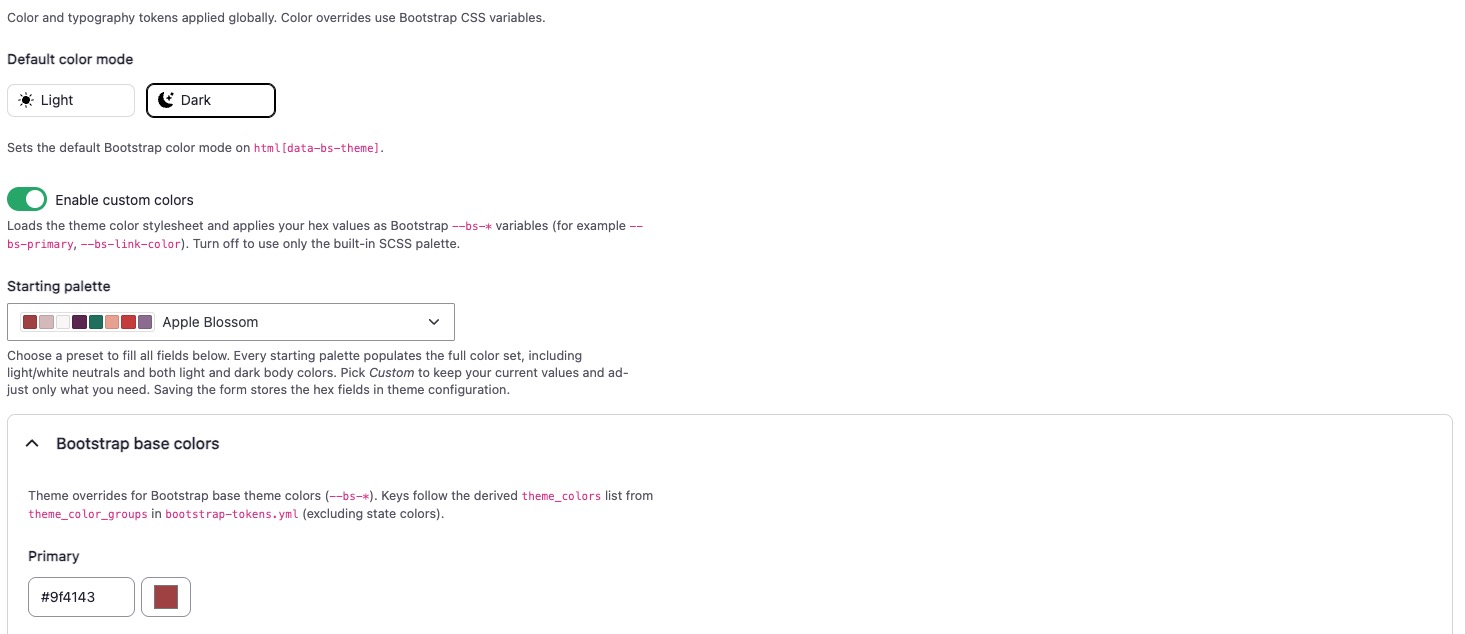
Colors
Centarro Bootstrap exposes a starting palette of brand tokens that you can adjust from the admin UI. Adapting to a new color scheme or spinning up a new sub-theme for an alternative brand is a few clicks away.
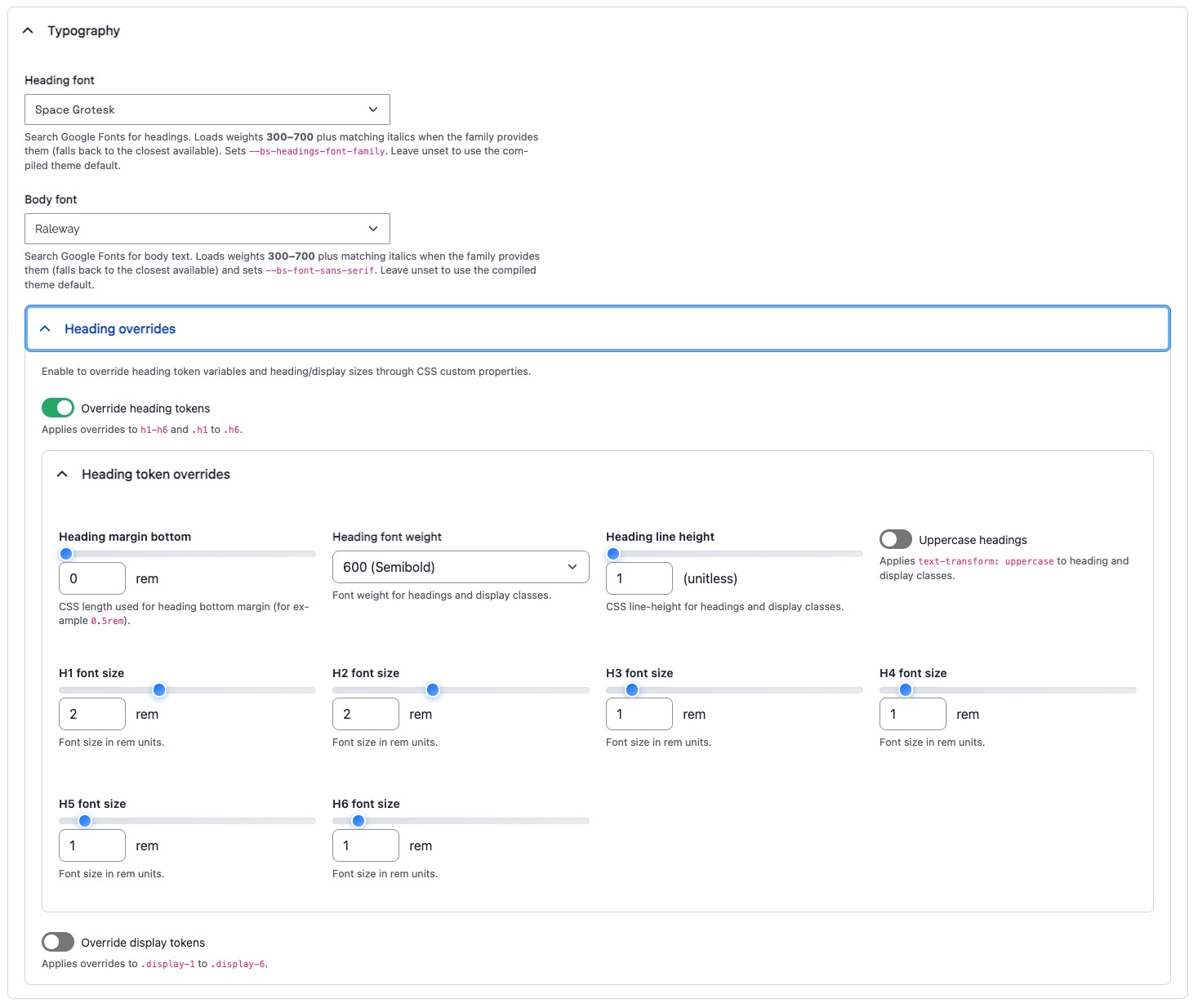
Typography
A built-in Google Fonts integration lets you change heading and body typefaces from the theme settings with a live preview of the result. Individual heading levels (H1 through H6) can be adjusted independently. The font selection is sourced from a local JSON index rather than a live API call, keeping the dependency footprint small.
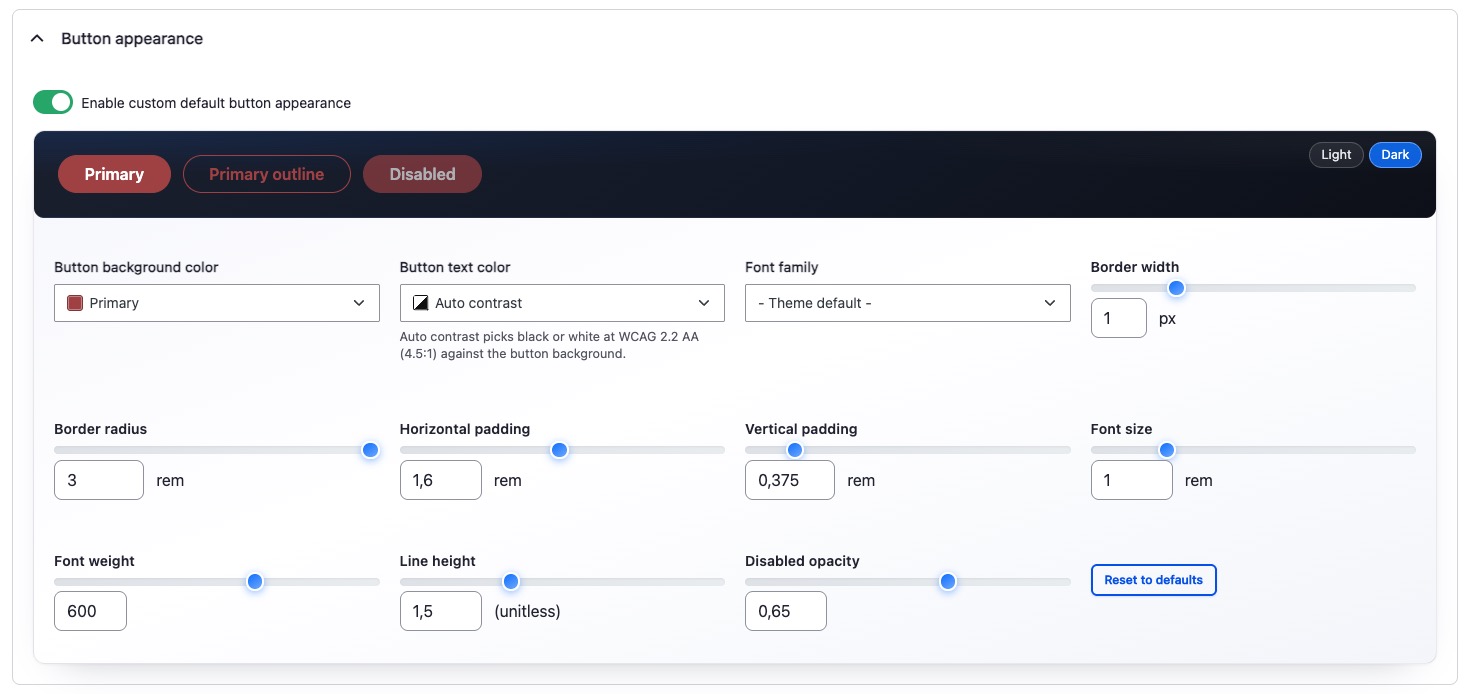
Buttons
Configure button appearance (border radius, padding, variant colors) from the admin UI and see the changes reflected across every button on the site. An auto-contrast feature automatically adjusts button text color to be black or white based on the background to meet WCAG 2.2 AA accessibility standards. You define a button as "primary" or "secondary," and the system handles the rest.
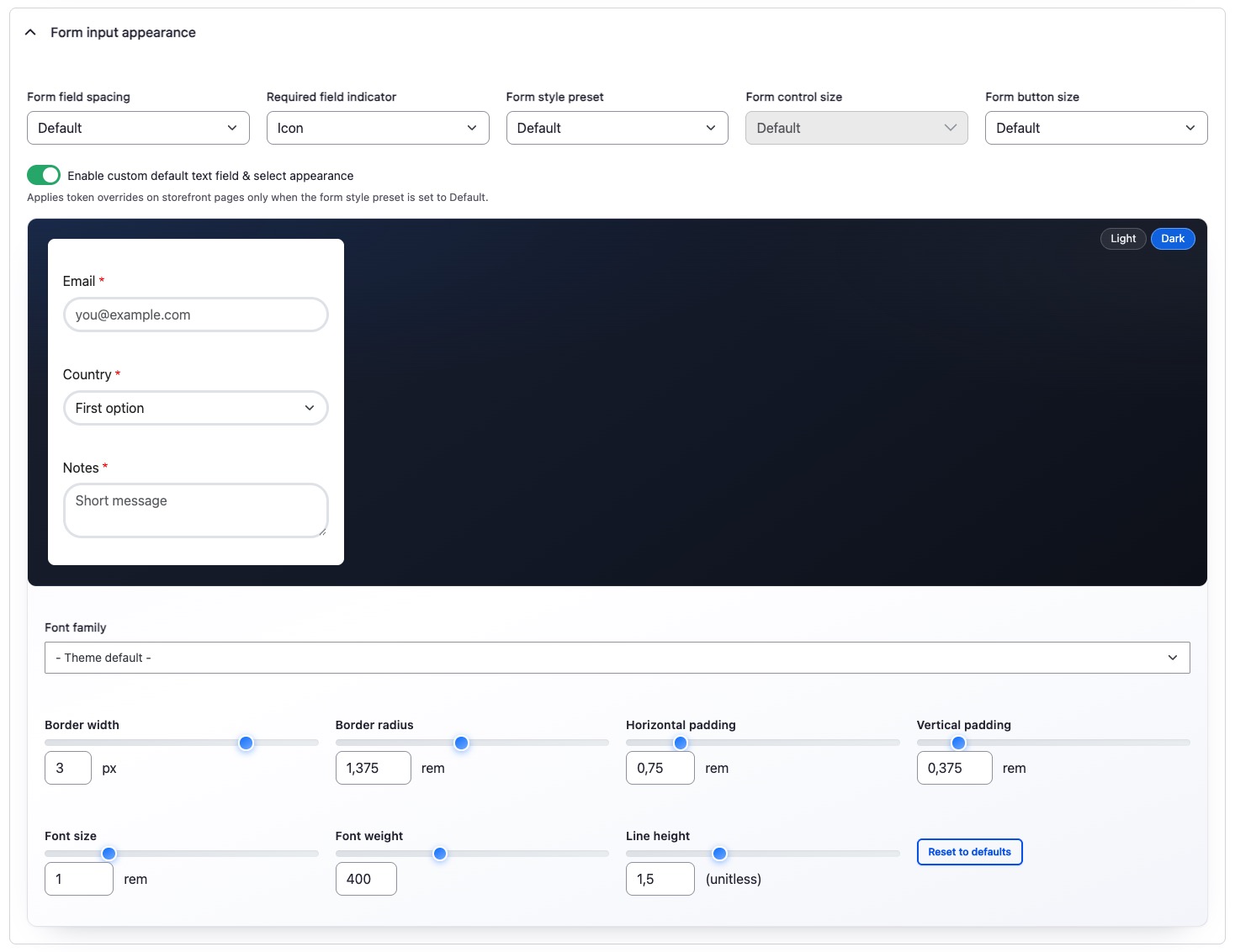
Forms
Input styling follows the same pattern: configure once in theme settings, applied everywhere.
The component library
Centarro Bootstrap ships with a full set of components implemented as Drupal's single directory components (SDCs). These follow atomic design principles: foundations like a background image, primitive "atoms" like headings and buttons that are deliberately simple and reusable, "molecules" that combine atoms into functional groups, and "organisms" that compose molecules into larger structures like carousels, or richer patterns in a sub-theme such as Astra.
The base components are intentionally minimal. A heading is just a heading. It can, for example, feed into a larger title component, which is composed of an eyebrow, heading, and description.
The real flexibility comes in sub-theming. When you create a sub-theme of Centarro Bootstrap with the starter kit, you get a copy of the theme settings, and you inherit all the base components. Override, extend, or create new components for your specific design and to your heart’s content. Centarro's own Content Privée site template demonstrates this: it builds on Centarro Bootstrap's atoms to create richer, more specialized components with additional options, all while inheriting the centralized brand configuration.
Why Bootstrap over Tailwind
Most Drupal site templates in the current ecosystem are built on Tailwind CSS. Centarro went a different direction. Why? For practical reasons.
Tailwind is a utility-first framework. You compose styles by stacking classes like "text-red-500 p-4 rounded-lg." That works well in many workflows, and once those classes live inside an SDC, Canvas can place the component just as easily as a Bootstrap one.
Bootstrap is different in kind. An accordion is not only a set of classes. It is CSS plus behavior: collapse behavior, keyboard handling, and a data-bs-* API that already ships with the framework. Tailwind does not include that layer. You add Alpine, a small custom behavior, or a component kit such as DaisyUI. Centarro Bootstrap uses Bootstrap’s packaged components, then wraps them as Drupal single directory components. You have fewer moving parts between “named component” and “working storefront UI”.
Sub-theming in Centarro Bootstrap
Centarro Bootstrap is explicit about where design decisions belong. The base theme handles the underlying system—the tokens, the component primitives, the configuration interface. The sub-theme handles the design—the specific visual identity for a given site or brand.
Agencies managing multiple commerce sites and organizations running multi-brand properties will find many tasks much simpler. The same Centarro Bootstrap foundation can power visually distinct sites. Each sub-theme inherits the base components and theme settings, applies its own brand configuration, and can add or override components as needed.
The starter kit handles the scaffolding. From there, the design work is primarily configuration, supplemented by custom components where the design requires something truly new.
AI-Ready Component Documentation
Every component in Centarro Bootstrap ships with documentation written for both human developers and AI coding assistants. Each component has an accompanying Markdown file that describes its props, its schema, and how it relates to other components in the system.
AI tools can read the documentation and generate new components that follow the system's conventions. A developer can prompt an AI assistant to create a benefit card component, for example, and the assistant can reference the existing atoms, understand the slot system, and produce a component that integrates correctly with the theme settings and Canvas.
We’ve been able to deliver theme development tasks much faster, something our clients have already benefited from.
Who Centarro Bootstrap is for
- Centarro clients. Every new Centarro commerce build will use Centarro Bootstrap as its foundation, which means faster project starts, more consistent output (the component library enforces patterns that have been refined across multiple client engagements), and lower long-term maintenance cost.
- Agencies and development teams. Rather than building a component library from scratch, they start with a system that already handles those concerns and focus their effort on the design layer and any truly custom functionality their project requires.
- Organizations evaluating Drupal Commerce. They know exactly how their website will be built. Centarro Bootstrap demonstrates that Drupal Commerce isn't just a back-end framework that requires a from-scratch front-end effort for every implementation. There's a configurable, maintainable design system foundation available, and it works with Drupal's latest page-building tools.
What’s ahead for Centarro Bootstrap
Centarro Bootstrap is actively being developed, with a few key milestones on the near-term roadmap.
- Focused Checkout. Centarro's opinionated checkout theme will be publicly available as a sub-theme of Centarro Bootstrap, giving the broader Drupal Commerce community a free entry point into the system.
- Extending Canvas capabilities. Today, Canvas is strongest at the top of the funnel, for landing pages and marketing content where content teams need autonomy to build and iterate quickly. The active work is extending that same component-driven, visually-editable approach to catalog pages and product detail pages, the parts of a commerce site where layout decisions directly affect conversion.
- Site templates. More premium site templates built on Centarro Bootstrap, with Content Privée and its Astra theme as the first example. These will be available through Drupal's site template marketplace and will demonstrate how quickly a distinct, functional commerce site can be customized on the Centarro Bootstrap foundation.
We want to compress the time between "we need a commerce site" and "we have a commerce site that matches our brand and works."
The design system setup that used to consume the first weeks of a project is now configuration. New components that require a front-end developer to build from scratch can be generated from documented patterns. Brand changes that once meant combing through stylesheets are a few clicks in theme settings.
Centarro Bootstrap still requires thoughtful design, but it removes the repetitive infrastructure work that can delay that design work. Teams can spend their time on the decisions that actually differentiate an eCommerce website rather than rebuilding the same foundation from scratch every time.
Add new comment